Retail billing software with barcode for Pakistani shops
Bill customers in seconds, accept the payment methods Pakistani customers actually use, and print a receipt.
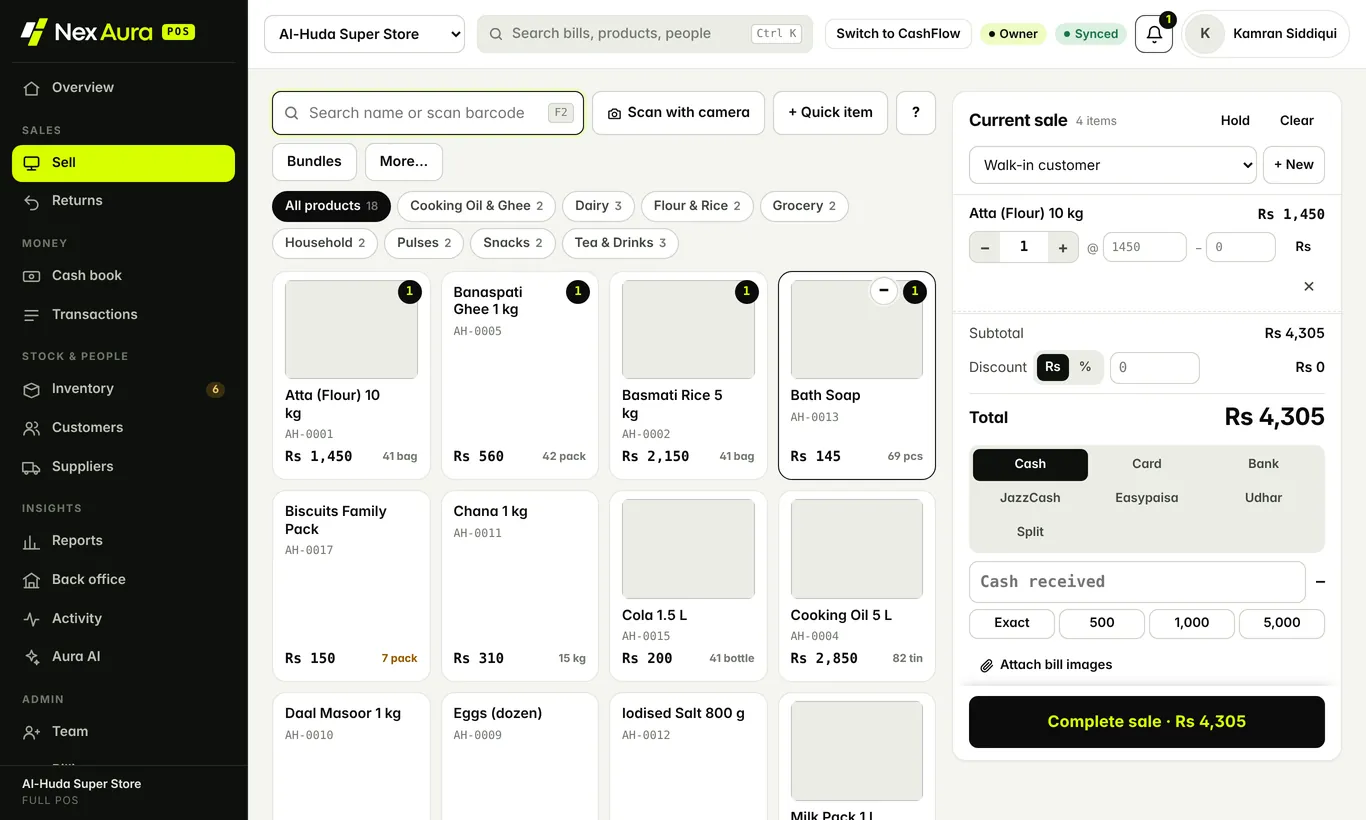
- Cash, card, bank, JazzCash, Easypaisa
- Udhaar or split payments on the same bill
- Print receipts
- Void bills only with permission
- Barcode scanning and labels
Billing that fits Pakistani payments
Customers pay in many ways: cash, card, a bank transfer, JazzCash, Easypaisa — or part now and the rest on udhaar.
In Full POS mode a single bill can take cash, card, bank, JazzCash, Easypaisa, udhaar or a split, and udhaar goes straight to the customer's khata. Receipts can be printed for the customer.
Control at the counter
Selling and printing receipts, voiding bills and processing sales returns and refunds are separate permissions. A Data Operator can bill all day without being able to cancel a bill or give a refund unless you allow it — see team roles.
Barcode and SKU
Scan product barcodes to add items to a bill, give products SKUs, and print labels for items that don't have a barcode.
Billing vs a bill book
A bill book gives the customer a slip but tells you nothing at closing time. Software billing feeds the same day's sales into your cash book and reports and every udhaar sale into the customer khata.
Faster at the counter
- Scan or search — use a USB barcode scanner, or the phone camera with Scan with camera.
- Hold a bill and serve the next customer, then come back to it.
- Quick items for things that are not in your product list yet.
- Discount limits per role — anything above the limit asks for a Manager or Owner PIN.
- Bundles and variants — sell a school list or gift pack as one line, or pick a size or colour of a product.
- Wholesale prices for customers in a wholesale group, and loyalty points that customers earn and redeem on bills.
- Raast QR on the Sell screen shows a QR code with the bill total for the customer to pay.
Receipts
Print on 58 mm or 80 mm receipt printers, print receipts in Urdu, or share the receipt on WhatsApp with an online copy. Your NTN and STRN can be shown on receipts.
Quotations and advance orders
Save a quotation and turn it into a bill later, or take an advance order with a deposit that shows on the customer's account until delivery.
Related
Frequently asked questions
Which payment methods can a bill use?
Cash, card, bank, JazzCash, Easypaisa, udhaar or a split between them.
Can a cashier cancel a bill?
Voiding a bill is a separate permission, so you decide who can do it.
Do I need a special billing machine?
No special machine is needed to start; NexAura POS runs in a web browser on a shop computer, laptop or phone.
Run your shop on NexAura POS
Start a 14-day free trial — no payment needed. Set up your business, add products or import them from Excel, and make your first bill today.